Part 4 : Deploy, Run Inference, Interpret Inference
Overview
Notebook 2: Train, Check Bias, Tune, Record Lineage, and Register a Model
Notebook 3: Mitigate Bias, Train New Model, Store in Registry
`Notebook 4: Deploy Model, Run Predictions <./4-deploy-run-inference-e2e.ipynb>`__
`Architecture <#deploy>`__
`Deploy an approved model and Run Inference via Feature Store <#deploy-model>`__
`Create a Predictor <#predictor>`__
`Run Predictions from Online FeatureStore <#run-predictions>`__
Notebook 5 : Create and Run an End-to-End Pipeline to Deploy the Model
In this section of the end to end use case, we will deploy the mitigated model that is the end-product of this fraud detection use-case. We will show how to run inference and also how to use Clarify to interpret or “explain” the model.
Install required and/or update third-party libraries
[ ]:
!python -m pip install -Uq pip
!python -m pip install -q awswrangler==2.2.0 imbalanced-learn==0.7.0 sagemaker==2.41.0 boto3==1.17.70
Load stored variables
Run the cell below to load any prevously created variables. You should see a print-out of the existing variables. If you don’t see anything you may need to create them again or it may be your first time running this notebook.
[ ]:
%store -r
%store
Important: You must have run the previous sequential notebooks to retrieve variables using the StoreMagic command.
Import libraries
[ ]:
import json
import time
import boto3
import sagemaker
import numpy as np
import pandas as pd
import awswrangler as wr
Set region, boto3 and SageMaker SDK variables
[ ]:
# You can change this to a region of your choice
import sagemaker

region = sagemaker.Session().boto_region_name
print("Using AWS Region: {}".format(region))
[ ]:
boto3.setup_default_session(region_name=region)

boto_session = boto3.Session(region_name=region)

s3_client = boto3.client("s3", region_name=region)

sagemaker_boto_client = boto_session.client("sagemaker")

sagemaker_session = sagemaker.session.Session(
    boto_session=boto_session, sagemaker_client=sagemaker_boto_client
)

sagemaker_role = sagemaker.get_execution_role()

account_id = boto3.client("sts").get_caller_identity()["Account"]
[ ]:
# variables used for parameterizing the notebook run
endpoint_name = f"{model_2_name}-endpoint"
endpoint_instance_count = 1
endpoint_instance_type = "ml.m4.xlarge"

predictor_instance_count = 1
predictor_instance_type = "ml.c5.xlarge"
batch_transform_instance_count = 1
batch_transform_instance_type = "ml.c5.xlarge"
Architecture for this ML Lifecycle Stage : Train, Check Bias, Tune, Record Lineage, Register Model
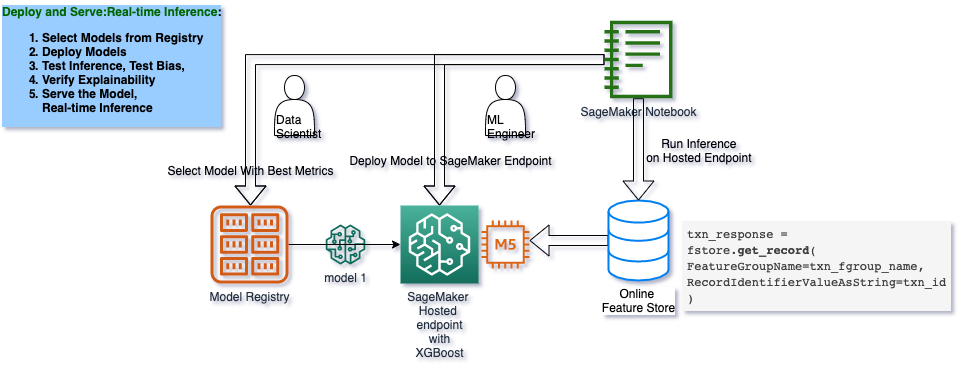
Deploy an approved model and make prediction via Feature Store
In the real-life MLOps lifecycle, a model package gets approved after evaluation by data scientists, subject matter experts and auditors.
[ ]:
second_model_package = sagemaker_boto_client.list_model_packages(ModelPackageGroupName=mpg_name)[
    "ModelPackageSummaryList"
][0]
model_package_update = {
    "ModelPackageArn": second_model_package["ModelPackageArn"],
    "ModelApprovalStatus": "Approved",
}

update_response = sagemaker_boto_client.update_model_package(**model_package_update)
Deploy the endpoint. This might take about 8minutes.
[ ]:
primary_container = {'ModelPackageName': second_model_package['ModelPackageArn']}
endpoint_config_name=f'{model_2_name}-endpoint-config'
existing_configs = len(sagemaker_boto_client.list_endpoint_configs(NameContains=endpoint_config_name, MaxResults = 30)['EndpointConfigs'])

if existing_configs == 0:
    create_ep_config_response = sagemaker_boto_client.create_endpoint_config(
        EndpointConfigName=endpoint_config_name,
        ProductionVariants=[{
            'InstanceType': endpoint_instance_type,
            'InitialVariantWeight': 1,
            'InitialInstanceCount': endpoint_instance_count,
            'ModelName': model_2_name,
            'VariantName': 'AllTraffic'
        }]
    )
    %store endpoint_config_name
[ ]:
existing_endpoints = sagemaker_boto_client.list_endpoints(NameContains=endpoint_name, MaxResults = 30)['Endpoints']
if not existing_endpoints:
    create_endpoint_response = sagemaker_boto_client.create_endpoint(
        EndpointName=endpoint_name,
        EndpointConfigName=endpoint_config_name)
    %store endpoint_name

endpoint_info = sagemaker_boto_client.describe_endpoint(EndpointName=endpoint_name)
endpoint_status = endpoint_info['EndpointStatus']

while endpoint_status == 'Creating':
    endpoint_info = sagemaker_boto_client.describe_endpoint(EndpointName=endpoint_name)
    endpoint_status = endpoint_info['EndpointStatus']
    print('Endpoint status:', endpoint_status)
    if endpoint_status == 'Creating':
        time.sleep(60)
Create a predictor
[ ]:
predictor = sagemaker.predictor.Predictor(
    endpoint_name=endpoint_name, sagemaker_session=sagemaker_session
)
Sample a claim from the test data
[ ]:
dataset = pd.read_csv("data/dataset.csv")
train = dataset.sample(frac=0.8, random_state=0)
test = dataset.drop(train.index)
sample_policy_id = int(test.sample(1)["policy_id"])
[ ]:
test.info()
Get sample’s claim data from online feature store
This will simulate getting data in real-time from a customer’s insurance claim submission.
[ ]:
featurestore_runtime = boto_session.client(
    service_name="sagemaker-featurestore-runtime", region_name=region
)

feature_store_session = sagemaker.Session(
    boto_session=boto_session,
    sagemaker_client=sagemaker_boto_client,
    sagemaker_featurestore_runtime_client=featurestore_runtime,
)
Run Predictions on Multiple Claims
[ ]:
import datetime as datetime

timer = []
MAXRECS = 100


def barrage_of_inference():
    sample_policy_id = int(test.sample(1)["policy_id"])

    temp_fg_name = "fraud-detect-demo-claims"

    claims_response = featurestore_runtime.get_record(
        FeatureGroupName=temp_fg_name, RecordIdentifierValueAsString=str(sample_policy_id)
    )

    if claims_response.get("Record"):
        claims_record = claims_response["Record"]
        claims_df = pd.DataFrame(claims_record).set_index("FeatureName")
    else:
        print("No Record returned / Record Key  \n")

    t0 = datetime.datetime.now()

    customers_response = featurestore_runtime.get_record(
        FeatureGroupName=customers_fg_name, RecordIdentifierValueAsString=str(sample_policy_id)
    )

    t1 = datetime.datetime.now()

    customer_record = customers_response["Record"]
    customer_df = pd.DataFrame(customer_record).set_index("FeatureName")

    blended_df = pd.concat([claims_df, customer_df]).loc[col_order].drop("fraud")
    data_input = ",".join(blended_df["ValueAsString"])

    results = predictor.predict(data_input, initial_args={"ContentType": "text/csv"})
    prediction = json.loads(results)
    # print (f'Probablitity the claim from policy {int(sample_policy_id)} is fraudulent:', prediction)

    arr = t1 - t0
    minutes, seconds = divmod(arr.total_seconds(), 60)

    timer.append(seconds)
    # print (prediction, " done in {} ".format(seconds))

    return sample_policy_id, prediction


for i in range(MAXRECS):
    sample_policy_id, prediction = barrage_of_inference()
    print(f"Probablitity the claim from policy {int(sample_policy_id)} is fraudulent:", prediction)
[ ]:
timer
Note: the above “timer” records the first call and then subsequent calls to the online Feature Store
[ ]:
import statistics
import numpy as np

statistics.mean(timer)


arr = np.array(timer)
print(
    "p95: {}, p99: {}, mean: {} for {} distinct feature store gets".format(
        np.percentile(arr, 95), np.percentile(arr, 99), np.mean(arr), MAXRECS
    )
)
Pull customer data from Customers feature group
When a customer submits an insurance claim online for instant approval, the insurance company will need to pull customer-specific data from the online feature store to add to the claim data as input for a model prediction.
[ ]:
customers_response = featurestore_runtime.get_record(
    FeatureGroupName=customers_fg_name, RecordIdentifierValueAsString=str(sample_policy_id)
)

customer_record = customers_response["Record"]
customer_df = pd.DataFrame(customer_record).set_index("FeatureName")


claims_response = featurestore_runtime.get_record(
    FeatureGroupName=claims_fg_name, RecordIdentifierValueAsString=str(sample_policy_id)
)

claims_record = claims_response["Record"]
claims_df = pd.DataFrame(claims_record).set_index("FeatureName")
Format the datapoint
The datapoint must match the exact input format as the model was trained–with all features in the correct order. In this example, the col_order variable was saved when you created the train and test datasets earlier in the guide.
[ ]:
blended_df = pd.concat([claims_df, customer_df]).loc[col_order].drop("fraud")
data_input = ",".join(blended_df["ValueAsString"])
Make prediction
[ ]:
results = predictor.predict(data_input, initial_args={"ContentType": "text/csv"})
prediction = json.loads(results)
print(f"Probablitity the claim from policy {int(sample_policy_id)} is fraudulent:", prediction)
Next Notebook: Create and Run an End-to-End Pipeline to Deploy the Model
Now that as a Data Scientist, you’ve manually experimented with each step in our machine learning workflow, you can take certain steps to allow for faster model creation and deployment without sacrificing transparency and tracking via model lineage. In the next section you will create a pipeline which trains a new model on SageMaker, persists the model in SageMaker and then adds the model to the registry and deploys it as a SageMaker hosted endpoint.
[ ]: