Recommendation Engine for E-Commerce Sales: Part 2. Train and Make Predictions
This notebook gives an overview of techniques and services offer by SageMaker to build and deploy a personalized recommendation engine.
Dataset
The dataset for this demo comes from the UCI Machine Learning Repository. It contains all the transactions occurring between 01/12/2010 and 09/12/2011 for a UK-based and registered non-store online retail. The company mainly sells unique all-occasion gifts. The following attributes are included in our dataset:
InvoiceNo: Invoice number. Nominal, a 6-digit integral number uniquely assigned to each transaction. If this code starts with letter ‘c’, it indicates a cancellation.
StockCode: Product (item) code. Nominal, a 5-digit integral number uniquely assigned to each distinct product.
Description: Product (item) name. Nominal.
Quantity: The quantities of each product (item) per transaction. Numeric.
InvoiceDate: Invice Date and time. Numeric, the day and time when each transaction was generated.
UnitPrice: Unit price. Numeric, Product price per unit in sterling.
CustomerID: Customer number. Nominal, a 5-digit integral number uniquely assigned to each customer.
Country: Country name. Nominal, the name of the country where each customer resides.
Citation: Daqing Chen, Sai Liang Sain, and Kun Guo, Data mining for the online retail industry: A case study of RFM model-based customer segmentation using data mining, Journal of Database Marketing and Customer Strategy Management, Vol. 19, No. 3, pp. 197–208, 2012 (Published online before print: 27 August 2012. doi: 10.1057/dbm.2012.17)
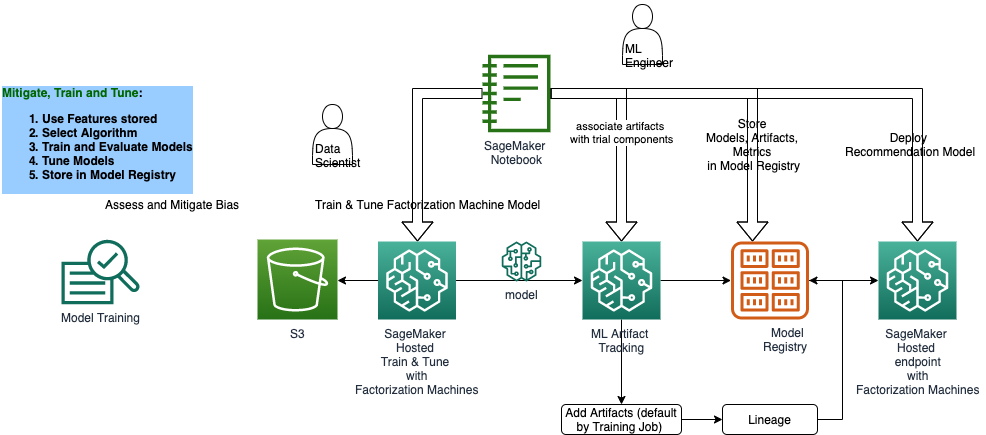
## Solution Architecture
[ ]:
[ ]:
[1]:
!pip install -Uq sagemaker boto3
[ ]:
%store -r
%store
[3]:
import sagemaker
from sagemaker.lineage import context, artifact, association, action
import boto3

from model_package_src.inference_specification import InferenceSpecification
import json
import numpy as np
import pandas as pd
import datetime
import time
from scipy.sparse import csr_matrix, hstack, load_npz
from sklearn.preprocessing import OneHotEncoder
from sklearn.feature_extraction.text import TfidfVectorizer
from sklearn.model_selection import train_test_split
[4]:
assert sagemaker.__version__ >= "2.21.0"
[5]:
region = boto3.Session().region_name
boto3.setup_default_session(region_name=region)
boto_session = boto3.Session(region_name=region)

s3_client = boto3.client("s3", region_name=region)

sagemaker_boto_client = boto_session.client("sagemaker")
sagemaker_session = sagemaker.session.Session(
    boto_session=boto_session, sagemaker_client=sagemaker_boto_client
)
sagemaker_role = sagemaker.get_execution_role()

bucket = sagemaker_session.default_bucket()

prefix = "personalization"

output_prefix = f"s3://{bucket}/{prefix}/output"
Read the data
Prepare Data For Modeling
Split the data into training and testing sets
Write the data to protobuf recordIO format for Pipe mode. Read more about protobuf recordIO format.
[6]:
# load array
X_train = load_npz("./data/X_train.npz")
X_test = load_npz("./data/X_test.npz")
y_train_npzfile = np.load("./data/y_train.npz")
y_test_npzfile = np.load("./data/y_test.npz")
y_train = y_train_npzfile.f.arr_0
y_test = y_test_npzfile.f.arr_0
[7]:
X_train.shape, X_test.shape, y_train.shape, y_test.shape
[7]:
((219519, 9284), (54880, 9284), (219519,), (54880,))
[8]:
input_dims = X_train.shape[1]
%store input_dims
Stored 'input_dims' (int)
Train the factorization machine model
Once we have the data preprocessed and available in the correct format for training, the next step is to actually train the model using the data.
We’ll use the Amazon SageMaker Python SDK to kick off training and monitor status until it is completed. In this example that takes only a few minutes. Despite the model only need 1-2 minutes to train, there is some extra time required upfront to provision hardware and load the algorithm container.
First, let’s specify our containers. To find the rigth container, we’ll create a small lookup. More details on algorithm containers can be found in AWS documentation.
[9]:
container = sagemaker.image_uris.retrieve("factorization-machines", region=boto_session.region_name)

fm = sagemaker.estimator.Estimator(
    container,
    sagemaker_role,
    instance_count=1,
    instance_type="ml.c5.xlarge",
    output_path=output_prefix,
    sagemaker_session=sagemaker_session,
)

fm.set_hyperparameters(
    feature_dim=input_dims,
    predictor_type="regressor",
    mini_batch_size=1000,
    num_factors=64,
    epochs=20,
)
[ ]:
if 'training_job_name' not in locals():

    fm.fit({'train': train_data_location, 'test': test_data_location})
    training_job_name = fm.latest_training_job.job_name
    %store training_job_name

else:
    print(f'Using previous training job: {training_job_name}')
[11]:
training_job_info = sagemaker_boto_client.describe_training_job(TrainingJobName=training_job_name)
Training data artifact
[12]:
training_data_s3_uri = training_job_info["InputDataConfig"][0]["DataSource"]["S3DataSource"][
    "S3Uri"
]

matching_artifacts = list(
    artifact.Artifact.list(source_uri=training_data_s3_uri, sagemaker_session=sagemaker_session)
)

if matching_artifacts:
    training_data_artifact = matching_artifacts[0]
    print(f"Using existing artifact: {training_data_artifact.artifact_arn}")
else:
    training_data_artifact = artifact.Artifact.create(
        artifact_name="TrainingData",
        source_uri=training_data_s3_uri,
        artifact_type="Dataset",
        sagemaker_session=sagemaker_session,
    )
    print(f"Create artifact {training_data_artifact.artifact_arn}: SUCCESSFUL")
Using existing artifact: arn:aws:sagemaker:us-east-2:645431112437:artifact/cdd7fbecb4eefa22c43b2ad48140acc2
Code Artifact
We do not need a code artifact because we are using a built-in SageMaker Algorithm called Factorization Machines. The Factorization Machines container contains all of the code and, by default, our model training stores the Factorization Machines image for tracking purposes.
Model artifact
[13]:
trained_model_s3_uri = training_job_info["ModelArtifacts"]["S3ModelArtifacts"]

matching_artifacts = list(
    artifact.Artifact.list(source_uri=trained_model_s3_uri, sagemaker_session=sagemaker_session)
)

if matching_artifacts:
    model_artifact = matching_artifacts[0]
    print(f"Using existing artifact: {model_artifact.artifact_arn}")
else:
    model_artifact = artifact.Artifact.create(
        artifact_name="TrainedModel",
        source_uri=trained_model_s3_uri,
        artifact_type="Model",
        sagemaker_session=sagemaker_session,
    )
    print(f"Create artifact {model_artifact.artifact_arn}: SUCCESSFUL")
Using existing artifact: arn:aws:sagemaker:us-east-2:645431112437:artifact/3acde2fc029adeff9c767be68feac3a7
Set artifact associations
[14]:
trial_component = sagemaker_boto_client.describe_trial_component(
    TrialComponentName=training_job_name + "-aws-training-job"
)
trial_component_arn = trial_component["TrialComponentArn"]
Store artifacts
[15]:
artifact_list = [[training_data_artifact, "ContributedTo"], [model_artifact, "Produced"]]

for art, assoc in artifact_list:
    try:
        association.Association.create(
            source_arn=art.artifact_arn,
            destination_arn=trial_component_arn,
            association_type=assoc,
            sagemaker_session=sagemaker_session,
        )
        print(f"Association with {art.artifact_type}: SUCCEESFUL")
    except:
        print(f"Association already exists with {art.artifact_type}")
Association already exists with DataSet
Association with Model: SUCCEESFUL
[ ]:
model_name = "retail-recommendations"
model_matches = sagemaker_boto_client.list_models(NameContains=model_name)["Models"]

if not model_matches:
    print(f"Creating model {model_name}")
    model = sagemaker_session.create_model_from_job(
        name=model_name,
        training_job_name=training_job_info["TrainingJobName"],
        role=sagemaker_role,
        image_uri=training_job_info["AlgorithmSpecification"]["TrainingImage"],
    )
else:
    print(f"Model {model_name} already exists.")
SageMaker Model Registry
Once a useful model has been trained and its artifacts properly associated, the next step is to register the model for future reference and possible deployment.
Create Model Package Group
A Model Package Groups holds multiple versions or iterations of a model. Though it is not required to create them for every model in the registry, they help organize various models which all have the same purpose and provide autiomatic versioning.
[17]:
if 'mpg_name' not in locals():
    timestamp = datetime.datetime.now().strftime('%Y-%m-%d-%H-%M')
    mpg_name = f'retail-recommendation-{timestamp}'
    %store mpg_name

print(f'Model Package Group name: {mpg_name}')
Stored 'mpg_name' (str)
Model Package Group name: retail-recommendation-2021-03-01-21-41
[18]:
mpg_input_dict = {
    "ModelPackageGroupName": mpg_name,
    "ModelPackageGroupDescription": "Recommendation for Online Retail Sales",
}
[ ]:
matching_mpg = sagemaker_boto_client.list_model_package_groups(NameContains=mpg_name)[
    "ModelPackageGroupSummaryList"
]

if matching_mpg:
    print(f"Using existing Model Package Group: {mpg_name}")
else:
    mpg_response = sagemaker_boto_client.create_model_package_group(**mpg_input_dict)
    print(f"Create Model Package Group {mpg_name}: SUCCESSFUL")
[20]:
model_metrics_report = {"regression_metrics": {}}

for metric in training_job_info["FinalMetricDataList"]:
    stat = {metric["MetricName"]: {"value": metric["Value"]}}
    model_metrics_report["regression_metrics"].update(stat)

with open("training_metrics.json", "w") as f:
    json.dump(model_metrics_report, f)

metrics_s3_key = f"training_jobs/{training_job_info['TrainingJobName']}/training_metrics.json"
s3_client.upload_file(Filename="training_metrics.json", Bucket=bucket, Key=metrics_s3_key)
Define the inference spec
[21]:
mp_inference_spec = InferenceSpecification().get_inference_specification_dict(
    ecr_image=training_job_info["AlgorithmSpecification"]["TrainingImage"],
    supports_gpu=False,
    supported_content_types=["application/x-recordio-protobuf", "application/json"],
    supported_mime_types=["text/csv"],
)

mp_inference_spec["InferenceSpecification"]["Containers"][0]["ModelDataUrl"] = training_job_info[
    "ModelArtifacts"
]["S3ModelArtifacts"]
Define model metrics
Metrics other than model quality can be defined. See the Boto3 documentation for creating a model package.
[22]:
model_metrics = {
    "ModelQuality": {
        "Statistics": {
            "ContentType": "application/json",
            "S3Uri": f"s3://{bucket}/{metrics_s3_key}",
        }
    }
}
[23]:
mp_input_dict = {
    "ModelPackageGroupName": mpg_name,
    "ModelPackageDescription": "Factorization Machine Model to create personalized retail recommendations",
    "ModelApprovalStatus": "PendingManualApproval",
    "ModelMetrics": model_metrics,
}

mp_input_dict.update(mp_inference_spec)
mp_response = sagemaker_boto_client.create_model_package(**mp_input_dict)
Wait until model package is completed
[24]:
mp_info = sagemaker_boto_client.describe_model_package(
    ModelPackageName=mp_response["ModelPackageArn"]
)
mp_status = mp_info["ModelPackageStatus"]

while mp_status not in ["Completed", "Failed"]:
    time.sleep(5)
    mp_info = sagemaker_boto_client.describe_model_package(
        ModelPackageName=mp_response["ModelPackageArn"]
    )
    mp_status = mp_info["ModelPackageStatus"]
    print(f"model package status: {mp_status}")
print(f"model package status: {mp_status}")
model package status: Completed
[25]:
model_package = sagemaker_boto_client.list_model_packages(ModelPackageGroupName=mpg_name)[
    "ModelPackageSummaryList"
][0]
model_package_update = {
    "ModelPackageArn": model_package["ModelPackageArn"],
    "ModelApprovalStatus": "Approved",
}

update_response = sagemaker_boto_client.update_model_package(**model_package_update)
[26]:
from sagemaker.lineage.visualizer import LineageTableVisualizer

viz = LineageTableVisualizer(sagemaker_session)
display(viz.show(training_job_name=training_job_name))
| Name/Source | Direction | Type | Association Type | Lineage Type | |
|---|---|---|---|---|---|
| 0 | s3://...1-03-01-21-36-56-437/output/model.tar.gz | Input | Model | Produced | artifact |
| 1 | s3://...12437/personalization/test/test.protobuf | Input | DataSet | ContributedTo | artifact |
| 2 | s3://...437/personalization/train/train.protobuf | Input | DataSet | ContributedTo | artifact |
| 3 | 40461...2.amazonaws.com/factorization-machines:1 | Input | Image | ContributedTo | artifact |
| 4 | s3://...1-03-01-21-36-56-437/output/model.tar.gz | Output | Model | Produced | artifact |
Make Predictions
Now that we’ve trained our model, we can deploy it behind an Amazon SageMaker real-time hosted endpoint. This will allow out to make predictions (or inference) from the model dyanamically.
Note, Amazon SageMaker allows you the flexibility of importing models trained elsewhere, as well as the choice of not importing models if the target of model creation is AWS Lambda, AWS Greengrass, Amazon Redshift, Amazon Athena, or other deployment target.
Here we will take the top customer, the customer who spent the most money, and try to find which items to recommend to them.
[27]:
from sagemaker.deserializers import JSONDeserializer
from sagemaker.serializers import JSONSerializer
[ ]:
class FMSerializer(JSONSerializer):
    def serialize(self, data):
        js = {"instances": []}
        for row in data:
            js["instances"].append({"features": row.tolist()})
        return json.dumps(js)


fm_predictor = fm.deploy(
    initial_instance_count=1,
    instance_type="ml.m4.xlarge",
    serializer=FMSerializer(),
    deserializer=JSONDeserializer(),
)
[30]:
# find customer who spent the most money
df = pd.read_csv("data/online_retail_preprocessed.csv")

df["invoice_amount"] = df["Quantity"] * df["UnitPrice"]
top_customer = (
    df.groupby("CustomerID").sum()["invoice_amount"].sort_values(ascending=False).index[0]
)
[31]:
def get_recommendations(df, customer_id, n_recommendations, n_ranks=100):
    popular_items = (
        df.groupby(["StockCode", "UnitPrice"])
        .nunique()["CustomerID"]
        .sort_values(ascending=False)
        .reset_index()
    )
    top_n_items = popular_items["StockCode"].iloc[:n_ranks].values
    top_n_prices = popular_items["UnitPrice"].iloc[:n_ranks].values

    # stock codes can have multiple descriptions, so we will choose whichever description is most common
    item_map = df.groupby("StockCode").agg(lambda x: x.value_counts().index[0])["Description"]

    # find customer's country
    df_subset = df.loc[df["CustomerID"] == customer_id]
    country = df_subset["Country"].value_counts().index[0]

    data = {
        "StockCode": top_n_items,
        "Description": [item_map[i] for i in top_n_items],
        "CustomerID": customer_id,
        "Country": country,
        "UnitPrice": top_n_prices,
    }

    df_inference = pd.DataFrame(data)

    # we need to build the data set similar to how we built it for training
    # it should have the same number of features as the training data
    enc = OneHotEncoder(handle_unknown="ignore")
    onehot_cols = ["StockCode", "CustomerID", "Country"]
    enc.fit(df[onehot_cols])
    onehot_output = enc.transform(df_inference[onehot_cols])

    vectorizer = TfidfVectorizer(min_df=2)
    unique_descriptions = df["Description"].unique()
    vectorizer.fit(unique_descriptions)
    tfidf_output = vectorizer.transform(df_inference["Description"])

    row = range(len(df_inference))
    col = [0] * len(df_inference)
    unit_price = csr_matrix((df_inference["UnitPrice"].values, (row, col)), dtype="float32")

    X_inference = hstack([onehot_output, tfidf_output, unit_price], format="csr")

    result = fm_predictor.predict(X_inference.toarray())
    preds = [i["score"] for i in result["predictions"]]
    index_array = np.array(preds).argsort()
    items = enc.inverse_transform(onehot_output)[:, 0]
    top_recs = np.take_along_axis(items, index_array, axis=0)[: -n_recommendations - 1 : -1]
    recommendations = [[i, item_map[i]] for i in top_recs]
    return recommendations
[32]:
print("Top 5 recommended products:")
get_recommendations(df, top_customer, n_recommendations=5, n_ranks=100)
Top 5 recommended products:
[32]:
[['22423', 'REGENCY CAKESTAND 3 TIER'],
 ['22776', 'SWEETHEART CAKESTAND 3 TIER'],
 ['22624', 'IVORY KITCHEN SCALES'],
 ['85123A', 'WHITE HANGING HEART T-LIGHT HOLDER'],
 ['85099B', 'JUMBO BAG RED RETROSPOT']]
[ ]: