Music Recommender Part 6: SageMaker Pipelines
In this final notebook, we’ll combine all the steps we’ve gone over in each individual notebook, and condense them down into a SageMaker Pipelines object which will automate the entire modeling process from the beginning of data ingestion to monitoring the model. SageMaker Pipelines is a tool for building machine learning pipelines that take advantage of direct SageMaker integration. Because of this integration, you can create a pipeline and set up SageMaker Projects for orchestration using a tool that handles much of the step creation and management for you. |
Contents
Install required and/or update third-party libraries
[ ]:
!python -m pip install -Uq pip
!python -m pip install -q sagemaker==2.45.0 imbalanced-learn awswrangler
Import libraries
[ ]:
import json
import boto3
import pathlib
import sagemaker
import numpy as np
import pandas as pd
import awswrangler as wr

from sagemaker.estimator import Estimator
from sagemaker.workflow.pipeline import Pipeline
from sagemaker.workflow.steps import CreateModelStep
from sagemaker.sklearn.processing import SKLearnProcessor
from sagemaker.workflow.step_collections import RegisterModel
from sagemaker.workflow.steps import ProcessingStep, TrainingStep
from sagemaker.processing import ProcessingInput, ProcessingOutput
from sagemaker.workflow.parameters import ParameterInteger, ParameterFloat, ParameterString
from sagemaker.feature_store.feature_group import FeatureGroup
[ ]:
sagemaker.__version__
Set region and boto3 config
[ ]:
import sys
import pprint
sys.path.insert(1, './code')
from parameter_store import ParameterStore

ps = ParameterStore(verbose=False)

parameters = ps.read('music-rec')

bucket = parameters['bucket']
prefix = parameters['prefix']
ratings_data_source = parameters['ratings_data_source']
tracks_data_source = parameters['tracks_data_source']
val_data_uri = f"s3://{bucket}/{prefix}/data/val/val_data.csv"
endpoint_name = parameters['endpoint_name']
mpg_name = parameters['mpg_name']
dw_ecrlist = parameters['dw_ecrlist']
[ ]:
region = boto3.Session().region_name
boto3.setup_default_session(region_name=region)
boto_session = boto3.Session(region_name=region)

s3_client = boto3.client('s3', region_name=region)

sagemaker_boto_client = boto_session.client('sagemaker')
sagemaker_session = sagemaker.session.Session(
    boto_session=boto_session,
    sagemaker_client=sagemaker_boto_client)
sagemaker_role = sagemaker.get_execution_role()

account_id = boto3.client('sts').get_caller_identity()["Account"]
[ ]:
processing_dir = "/opt/ml/processing"

# Output name is auto-generated from the select node's ID + output name from the flow file.
# You can change to a different node ID to export a different step in the flow file
output_name_tracks = "19ad8e80-2002-4ee9-9753-fe9a384b1166.default" # tracks node in flow file
output_name_user_preferences = "7a6dad19-2c80-43e3-b03d-ec23c3842ae9.default" # joined node in flow file"
output_name_ratings = "9a283380-91ca-478e-be99-6ba3bf57c680.default" # ratings node in flow file

#======> variables used for parameterizing the notebook run
flow_instance_count = 1
flow_instance_type = "ml.m5.4xlarge"

deploy_model_instance_type = "ml.m4.xlarge"
Architecture: Create a SageMaker Pipeline to Automate All the Steps from Data Prep to Model Deployment
back to top
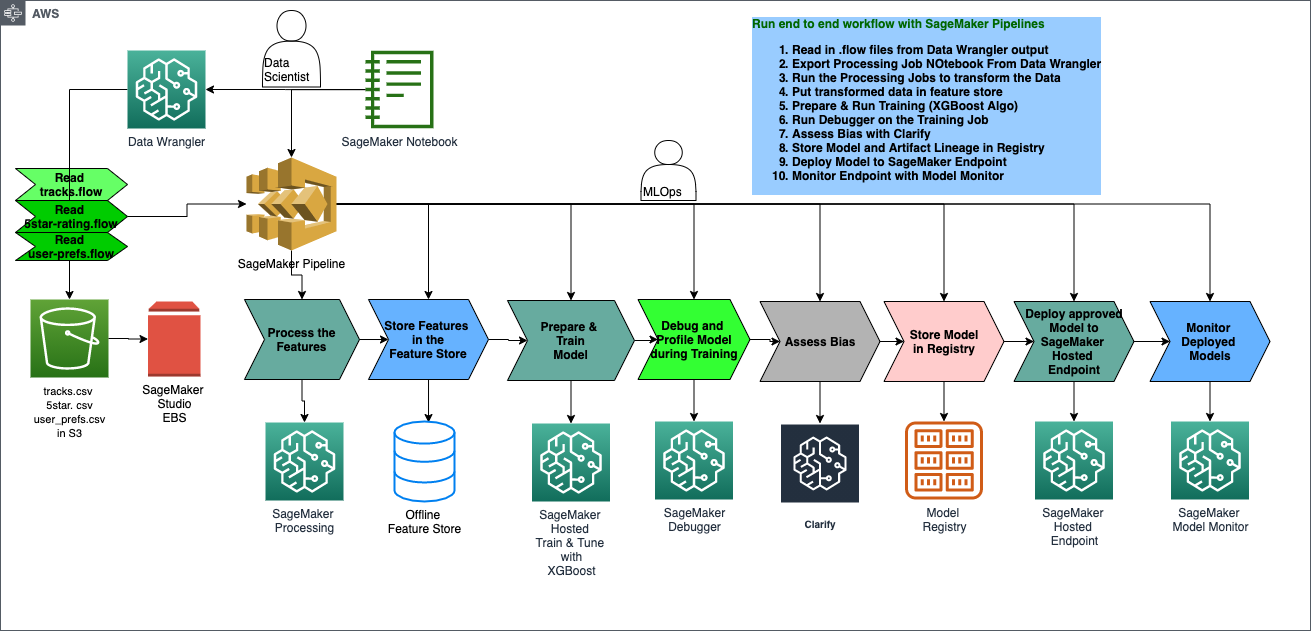
SageMaker Pipeline Overview
back to top
Step 1: Data Wrangler Preprocessing Step
Step 2: Dataset and train test split
Step 3: Train XGboost Model
Step 4: Model Pre-deployment
Step 5: Register Model
Step 6: Deploy Model
Step 7: Monitor Model
Combine Steps and Run Pipeline
Now that you’ve manually done each step in our machine learning workflow, you can certain steps to allow for faster model experimentation without sacrificing transparncy and model tracking. In this section you will create a pipeline which trains a new model, persists the model in SageMaker and then adds the model to the registry.
Pipeline parameters
An important feature of SageMaker Pipelines is the ability to define the steps ahead of time, but be able to change the parameters to those steps at execution without having to re-define the pipeline. This can be achieved by using ParameterInteger, ParameterFloat or ParameterString to define a value upfront which can be modified when you call pipeline.start(parameters=parameters) later. Only certain parameters can be defined this way.
[ ]:
train_instance_param = ParameterString(
    name="TrainingInstance",
    default_value="ml.m4.xlarge",
)

model_approval_status = ParameterString(
    name="ModelApprovalStatus",
    default_value="PendingManualApproval"
)
### Step 1: Data Wranger Preprocessing Step Pipeline Overview
This will become an input to the first step and, as such, needs to be in S3.
[ ]:
# name of the flow file which should exist in the current notebook working directory
flow_file_name = "01_music_dataprep.flow"

s3_client.upload_file(Filename=flow_file_name, Bucket=bucket, Key=f'{prefix}/dataprep-notebooks/music_dataprep.flow')
flow_s3_uri = f's3://{bucket}/{prefix}/dataprep-notebooks/music_dataprep.flow'

print(f"Data Wrangler flow {flow_file_name} uploaded to {flow_s3_uri}")
In this step, new data from source= will be transformed according to the SageMaker Data Wrangler .flow file and later added to the existing feature groups we created in the 02 notebooks.
[ ]:
data_sources = []

## Input - S3 Source: tracks.csv
data_sources.append(ProcessingInput(
    source=f"s3://{bucket}/{prefix}/data/tracks_new.csv", # You can override this to point to another dataset on S3
    destination=f"{processing_dir}/data/tracks_new.csv",
    input_name="tracks_new.csv",
    s3_data_type="S3Prefix",
    s3_input_mode="File",
    s3_data_distribution_type="FullyReplicated"
))

## Input - S3 Source: ratings.csv
data_sources.append(ProcessingInput(
    source=f"s3://{bucket}/{prefix}/data/ratings_new.csv", # You can override this to point to another dataset on S3
    destination=f"{processing_dir}/data/ratings_new.csv",
    input_name="ratings_new.csv",
    s3_data_type="S3Prefix",
    s3_input_mode="File",
    s3_data_distribution_type="FullyReplicated"
))

## Input - Flow: 01_music_dataprep.flow
flow_input = ProcessingInput(
    source=flow_s3_uri,
    destination=f"{processing_dir}/flow",
    input_name="flow",
    s3_data_type="S3Prefix",
    s3_input_mode="File",
    s3_data_distribution_type="FullyReplicated"
)
[ ]:
# Define feature group names we previously created in notebooks 02a-c
fg_name_tracks = parameters['fg_name_tracks']
fg_name_ratings = parameters['fg_name_ratings']
fg_name_user_preferences = parameters['fg_name_user_preferences']
dw_ecrlist = parameters['dw_ecrlist']
[ ]:
flow_output_tracks = sagemaker.processing.ProcessingOutput(
    output_name=output_name_tracks,
    app_managed=True,
    feature_store_output=sagemaker.processing.FeatureStoreOutput(
        feature_group_name=fg_name_tracks)
    )

flow_output_user_preferences = sagemaker.processing.ProcessingOutput(
    output_name=output_name_user_preferences,
    app_managed=True,
    feature_store_output=sagemaker.processing.FeatureStoreOutput(
        feature_group_name=fg_name_user_preferences)
    )

flow_output_ratings = sagemaker.processing.ProcessingOutput(
    output_name=output_name_ratings,
    app_managed=True,
    feature_store_output=sagemaker.processing.FeatureStoreOutput(
        feature_group_name=fg_name_ratings)
    )
[ ]:
# Output configuration used as processing job container arguments
output_config_tracks = {
    output_name_tracks: {
        "content_type": "CSV"
    }
}

output_config_user_preferences = {
    output_name_user_preferences: {
        "content_type": "CSV"
    }
}

output_config_ratings = {
    output_name_ratings: {
        "content_type": "CSV"
    }
}
[ ]:
from sagemaker.network import NetworkConfig
[ ]:
# Data Wrangler Container URL
# You can also find the proper container uri by exporting your Data Wrangler flow to a pipeline notebook

container_uri = f"{dw_ecrlist['region'][region]}.dkr.ecr.{region}.amazonaws.com/sagemaker-data-wrangler-container:1.x"


flow_processor = sagemaker.processing.Processor(
    role=sagemaker_role,
    image_uri=container_uri,
    instance_count=flow_instance_count,
    instance_type=flow_instance_type,
    volume_size_in_gb=30,
    network_config=NetworkConfig(enable_network_isolation=False),
    sagemaker_session=sagemaker_session
)

flow_step_tracks = ProcessingStep(
    name='DataWranglerStepTracks',
    processor=flow_processor,
    inputs=[flow_input] + data_sources,
    outputs=[flow_output_tracks],
    job_arguments=[f"--output-config '{json.dumps(output_config_tracks)}'"],
)

flow_step_ratings = ProcessingStep(
    name='DataWranglerStepRatings',
    processor=flow_processor,
    inputs=[flow_input] + data_sources,
    outputs=[flow_output_ratings],
    job_arguments=[f"--output-config '{json.dumps(output_config_ratings)}'"]
)

flow_step_user_preferences = ProcessingStep(
    name='DataWranglerStepUserPref',
    processor=flow_processor,
    inputs=[flow_input] + data_sources,
    outputs=[flow_output_user_preferences],
    job_arguments=[f"--output-config '{json.dumps(output_config_user_preferences)}'"]
)
### Step 2: Create Dataset and Train/Test Split
[ ]:
s3_client.upload_file(Filename='./code/create_datasets.py', Bucket=bucket, Key=f'{prefix}/code/create_datasets.py')
create_dataset_script_uri = f's3://{bucket}/{prefix}/code/create_datasets.py'

create_dataset_processor = SKLearnProcessor(
    framework_version='0.23-1',
    role=sagemaker_role,
    instance_type="ml.m5.4xlarge",
    instance_count=2,
    volume_size_in_gb=100,
    base_job_name='music-recommendation-split-data',
    sagemaker_session=sagemaker_session)

create_dataset_step = ProcessingStep(
    name='SplitData',
    processor=create_dataset_processor,
    outputs = [
        sagemaker.processing.ProcessingOutput(output_name='train_data', source=f'{processing_dir}/output/train'),
        sagemaker.processing.ProcessingOutput(output_name='test_data',  source=f'{processing_dir}/output/test')
    ],
    job_arguments=["--feature-group-name-tracks", fg_name_tracks,
                   "--feature-group-name-ratings", fg_name_ratings,
                   "--feature-group-name-user-preferences", fg_name_user_preferences,
                   "--bucket-name", bucket,
                   "--bucket-prefix", prefix,
                   "--region", region
                  ],
    code=create_dataset_script_uri,
    depends_on=[flow_step_tracks.name, flow_step_ratings.name, flow_step_user_preferences.name]
)
### Step 3: Train XGBoost Model In this step we use the ParameterString
train_instance_paramdefined at the beginning of the pipeline.
[ ]:
hyperparameters = {
    "max_depth": "4",
    "eta": "0.2",
    "objective": "reg:squarederror",
    "num_round": "100"
}

save_interval = 5
[ ]:
xgb_estimator = Estimator(
    role=sagemaker_role,
    instance_count=2,
    instance_type='ml.m5.4xlarge',
    volume_size=60,
    image_uri=sagemaker.image_uris.retrieve("xgboost", region, "0.90-2"),
    hyperparameters=hyperparameters,
    output_path=f's3://{bucket}/{prefix}/training_jobs',
    base_job_name='xgb-music-rec-model-pipeline',
    max_run=1800
)
[ ]:
train_step = TrainingStep(
    name='TrainStep',
    estimator=xgb_estimator,
    inputs={
        'train': sagemaker.inputs.TrainingInput(
            s3_data=create_dataset_step.properties.ProcessingOutputConfig.Outputs['train_data'].S3Output.S3Uri,
            content_type="text/csv"
        ),
        'validation': sagemaker.inputs.TrainingInput(
            s3_data=create_dataset_step.properties.ProcessingOutputConfig.Outputs['test_data'].S3Output.S3Uri,
            content_type="text/csv"
        )
    }
)
[ ]:
#TuningStep
[ ]:
### Step 4: Model Pre-Deployment Step
[ ]:
model = sagemaker.model.Model(
    name='music-recommender-xgboost-model',
    image_uri=train_step.properties.AlgorithmSpecification.TrainingImage,
    model_data=train_step.properties.ModelArtifacts.S3ModelArtifacts,
    sagemaker_session=sagemaker_session,
    role=sagemaker_role
)

inputs = sagemaker.inputs.CreateModelInput(
    instance_type="ml.m4.xlarge"
)

create_model_step = CreateModelStep(
    name="CreateModel",
    model=model,
    inputs=inputs
)
### Step 5: Register Model In this step you will use the ParameterString
model_approval_statusdefined at the outset of the pipeline code.
[ ]:
register_step = RegisterModel(
    name="XgboostRegisterModel",
    estimator=xgb_estimator,
    model_data=train_step.properties.ModelArtifacts.S3ModelArtifacts,
    content_types=["text/csv"],
    response_types=["text/csv"],
    inference_instances=["ml.t2.medium", "ml.m5.xlarge"],
    transform_instances=["ml.m5.xlarge"],
    model_package_group_name=prefix,
    approval_status=model_approval_status,
)
### Step 6: Deploy Model
[ ]:
s3_client.upload_file(Filename='./code/deploy_model.py', Bucket=bucket, Key=f'{prefix}/code/deploy_model.py')
deploy_model_script_uri = f's3://{bucket}/{prefix}/code/deploy_model.py'
pipeline_endpoint_name = 'music-rec-model-endpoint'

deploy_model_processor = SKLearnProcessor(
    framework_version='0.23-1',
    role=sagemaker_role,
    instance_type='ml.m5.xlarge',
    instance_count=1,
    volume_size_in_gb=60,
    base_job_name='music-recommender-deploy-model',
    sagemaker_session=sagemaker_session)

deploy_step = ProcessingStep(
    name='DeployModel',
    processor=deploy_model_processor,
    job_arguments=[
        "--model-name", create_model_step.properties.ModelName,
        "--region", region,
        "--endpoint-instance-type", deploy_model_instance_type,
        "--endpoint-name", pipeline_endpoint_name
    ],
    code=deploy_model_script_uri)
### Step 7: Monitor Model Deployed to SageMaker Hosted Endpoint
[ ]:
s3_client.upload_file(Filename='./code/model_monitor.py', Bucket=bucket, Key=f'{prefix}/code/model_monitor.py')
model_monitor_script_uri = f's3://{bucket}/{prefix}/code/model_monitor.py'
mon_schedule_name_base = 'music-recommender-daily-monitor'


model_monitor_processor = SKLearnProcessor(
    framework_version='0.23-1',
    role=sagemaker_role,
    instance_type='ml.m5.xlarge',
    instance_count=1,
    volume_size_in_gb=60,
    base_job_name='music-recommendation-model-monitor',
    sagemaker_session=sagemaker_session)

monitor_model_step = ProcessingStep(
    name='ModelMonitor',
    processor=model_monitor_processor,
    outputs = [
        sagemaker.processing.ProcessingOutput(output_name='model_baseline', source=f'{processing_dir}/output/baselineresults')
    ],
    job_arguments=["--baseline-data-uri", val_data_uri,
                   "--bucket-name", bucket,
                   "--bucket-prefix", prefix,
                   "--endpoint", pipeline_endpoint_name,
                   "--region", region,
                   "--schedule-name", mon_schedule_name_base
                  ],
    code=model_monitor_script_uri,
    depends_on=[deploy_step.name]
)
Combine the Pipeline Steps and Run
Once all of our steps are defined, we can put them together using the SageMaker Pipeline object. While we pass the steps in order so that it is easier to read, technically the order that we pass them does not matter since the pipeline DAG will parse it out properly based on any dependencies between steps. If the input of one step is the output of another step, the Pipelines understands which must come first.
[ ]:
pipeline_name = f'MusicRecommendationPipeline'
dataprep_pipeline_name = f'MusicRecommendationDataPrepPipeline'
train_deploy_pipeline_name = f'MusicRecommendationTrainDeployPipeline'

ps.add({'pipeline_name':pipeline_name, 'dataprep_pipeline_name':dataprep_pipeline_name,
        'train_deploy_pipeline_name':train_deploy_pipeline_name,
        'pipeline_endpoint_name':pipeline_endpoint_name},
       namespace='music-rec'
)
ps.store()
Option 1: The Entire Pipeline End to end
[ ]:
pipeline_name = f'MusicRecommendationPipeline'

ps.add({'pipeline_name':pipeline_name}, namespace='music-rec')
[ ]:
pipeline = Pipeline(
    name=pipeline_name,
    parameters=[
        train_instance_param,
        model_approval_status],
    steps=[
        flow_step_tracks,
        flow_step_user_preferences,
        flow_step_ratings,
        create_dataset_step,
        train_step,
        create_model_step,
        register_step,
        deploy_step,
        monitor_model_step
    ])
Sometimes we may want to run a number of data prep steps and split the data, getting it ready for training and beyond. This may require multiple iterations. We can separate this process from the rest of the pipeline by including only these data prep steps in their own smaller data prep pipeline.
This allows you to have separation of concerns around the preparation of data distinct from that of training, tuning, deployment, inference and monitoring until you want to kick off a retraining only, data prep only, or the complete pipeline. With SageMaker Pipelines you have the flexibility of doing any one of these in a modular and iterative manner.
[ ]:
pipeline_dataprep = Pipeline(
    name=dataprep_pipeline_name,
    parameters=[
        train_instance_param,
        model_approval_status],
    steps=[
        flow_step_tracks,
        flow_step_user_preferences,
        flow_step_ratings,
        create_dataset_step
    ])
[ ]:
create_dataset_step_no_depend = ProcessingStep(
    name='SplitData',
    processor=create_dataset_processor,
    outputs = [
        sagemaker.processing.ProcessingOutput(output_name='train_data', source=f'{processing_dir}/output/train'),
        sagemaker.processing.ProcessingOutput(output_name='test_data',  source=f'{processing_dir}/output/test')
    ],
    job_arguments=["--feature-group-name-tracks", fg_name_tracks,
                   "--feature-group-name-ratings", fg_name_ratings,
                   "--feature-group-name-user-preferences", fg_name_user_preferences,
                   "--bucket-name", bucket,
                   "--bucket-prefix", prefix,
                   "--region", region
                  ],
    code=create_dataset_script_uri
)
[ ]:
pipeline_train_deploy_monitor = Pipeline(
    name=train_deploy_pipeline_name,
    parameters=[
        train_instance_param,
        model_approval_status],
    steps=[
        create_dataset_step_no_depend,
        train_step,
        create_model_step,
        register_step,
        deploy_step,
        monitor_model_step
    ])
Submit the pipeline definition to the SageMaker Pipeline service
Note: If an existing pipeline has the same name it will be overwritten.
Let’s choose the pipeline we want to run
[ ]:
pipeline.upsert(role_arn=sagemaker_role)
pipeline_dataprep.upsert(role_arn=sagemaker_role)
pipeline_train_deploy_monitor.upsert(role_arn=sagemaker_role)
View the entire pipeline definition
Viewing the pipeline definition will all the string variables interpolated may help debug pipeline bugs. It is commented out here due to length.
[ ]:
#json.loads(pipeline.describe()['PipelineDefinition'])
Run the pipeline
Note this will take about 1 hour to complete. You can watch the progress of the Pipeline Job on your SageMaker Studio Components panel
[ ]:
# Special pipeline parameters can be defined or changed here
parameters = {'TrainingInstance': 'ml.m5.4xlarge'}
Earlier in the notebook, we defines several ProcessingStep()s and a TrainingStep() which our Pipeline() instance here will reference and kick off.
[ ]:
%%time
start_response = pipeline.start(parameters=parameters)
# start_response = pipeline_dataprep.start(parameters=parameters)
# start_response = pipeline_train_deploy_monitor.start(parameters=parameters)
start_response.wait(delay=60, max_attempts=200)
start_response.describe()
After completion we can use Sagemaker Studio’s Components and Registries tab to see our Pipeline graph and any further error or log messages.
[ ]: